Advanced Features
Flowcus Radar
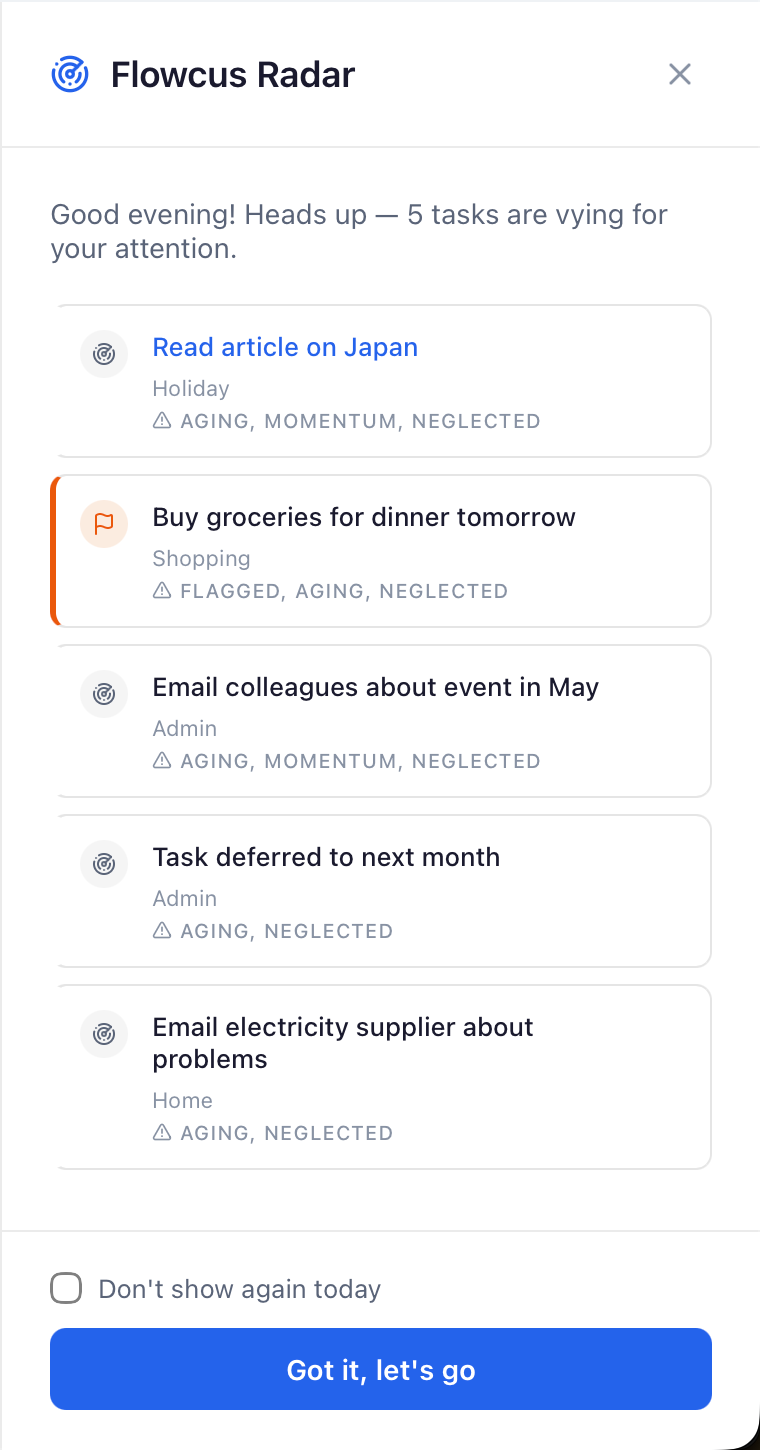
Radar analyses your open tasks each day and presents the 3–5 you should focus on, scored by urgency, momentum, and neglect — with clear reasons why each one ranked. It surfaces what matters so you can start your day with confidence rather than scanning your entire board.
How scoring works
Each task starts at 0 points. Points are added or subtracted based on these factors:
| Points | Reason | Trigger |
|---|---|---|
| +10 | Overdue | Due date is in the past |
| +8 | Due today | Due date is today (mutually exclusive with Overdue) |
| +4 | Aging | Task was created more than 7 days ago |
| +3 | Flagged | Task is flagged in your task manager |
| +3 | Momentum | Task has been in an active column for more than 3 days |
| +2 | Neglected | Task belongs to a project with no completions in the last 5 days |
| -5 | Blocked | Task is marked as blocked |
What each reason means
- Overdue — This task is past its due date. It's the strongest signal that something needs action.
- Due today — The deadline is today. Handle it before it becomes overdue.
- Aging — This task has been sitting around for over a week. It may be something you keep putting off.
- Flagged — You explicitly marked this task as important in your task manager.
- Momentum — This task is in your active (Doing) column but hasn't moved in over 3 days. It may be stuck.
- Neglected — The project this task belongs to hasn't had any completions in 5+ days. The whole project may need attention.
- Blocked — Something is preventing progress. The -5 penalty pushes blocked tasks down the list since you can't act on them right now.
What's excluded
The Radar only scores incomplete, non-dropped tasks. Tasks in the Done or Dropped columns are never shown.
Ghost Tasks
Ghost Detection finds the tasks you've been avoiding — the vaguely defined ones, the stale ones, and the ones that slipped backward — and prompts you to deal with them before they become dead weight.
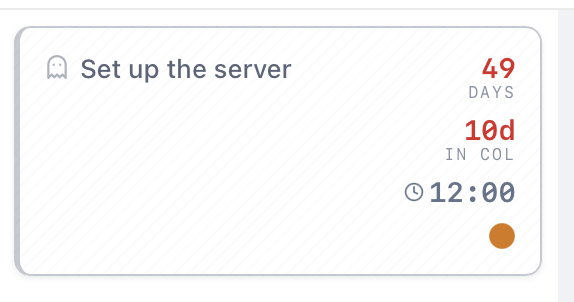
A task becomes a ghost when it matches one or more of these criteria:
-
Stale — The task hasn't been modified in a while. For tasks in active columns, this means more than 7 days without a change. For tasks in queue or backlog columns, the threshold is 14 days (since these are expected to sit longer).
-
Vague — The task name is too short or lacks a clear action verb. "Taxes" is vague; "File tax return" is not. Flowcus uses a clarity scoring system to evaluate task names and flag those that are ambiguous.
-
Moved Backward — The task was moved from a later column to an earlier one in the last 30 days, signalling regression rather than progress.
-
Sparse — The task has no notes and no subtasks, and was created more than 3 days ago. New tasks get a grace period, but older tasks with no detail are worth reviewing.
Each criterion contributes to a severity score. Ghosts are visually highlighted on the board at two tiers:
- Low severity: The task matches one criterion (e.g. stale)
- High severity: The task matches multiple criteria (e.g. stale and vague)
Snoozing Ghosts
If a ghost is flagged but you're not ready to deal with it yet, you can snooze it. Right-click on a ghost task and choose "Snooze Ghost" to dismiss the ghost highlight temporarily. The task will reappear as a ghost after the snooze period expires.
The following tasks are never flagged as ghosts:
- Completed or dropped tasks
- Tasks deferred until a future date
- Snoozed tasks
- Tasks without a board position
Projects View
The Projects view steps back from individual tasks to give you a portfolio-level read on your OmniFocus projects — which ones are moving, which have stalled, and which have quietly gone dead. Where the board shows you tasks, Projects shows you the health of the projects those tasks belong to.
Projects is a beta feature and currently supports OmniFocus only. It appears automatically when OmniFocus is connected; the first time you open it, Flowcus flags that it's still maturing and the data and layout may change.
It has two tabs: a Health list and a Matrix scatter plot. Both read the same project data, so you can search and filter in one and switch to the other.
Project health signals
Every project is summarised by a few computed signals, derived from your synced tasks:
- Open actions — the number of incomplete, non-dropped tasks remaining in the project.
- Completion % — completed tasks as a share of all tasks (completed + open).
- Last activity — how long it's been since anything in the project changed.
- Age — how long ago the project was created.
From these, each project lands in exactly one lifecycle status:
- Active — has open actions and recent activity.
- Stalled — has no open actions (no available next step), or nothing has changed in more than 14 days.
- On Hold — explicitly paused in OmniFocus. This is an intentional state, so it always takes precedence over the others.
A project is also flagged as a Zombie when it's still active but hasn't had a single action completed or added in more than 21 days. This is a deliberately stricter signal than "stalled": a stray edit resets staleness, but only real progress clears the zombie flag. Zombies are the projects most likely to need a decision — finish, defer, or drop.
Health list
The Health tab lists every project with its signals, sorted most-stale-first by default so the projects that need attention rise to the top. You can:
- Sort by any column — staleness, name, open actions, completion, folder, or the project's defer / planned / due dates.
- Search by project name.
- Filter by status — Active, Stalled and On Hold chips. By default Active and Stalled are shown and On Hold is hidden.
- Filter by type — Parallel, Sequential and Single-action chips. By default the real projects (parallel and sequential) are shown and single-action lists are hidden.
- Group by folder — organise the list under your OmniFocus folder hierarchy, with full breadcrumb paths.
Health Matrix
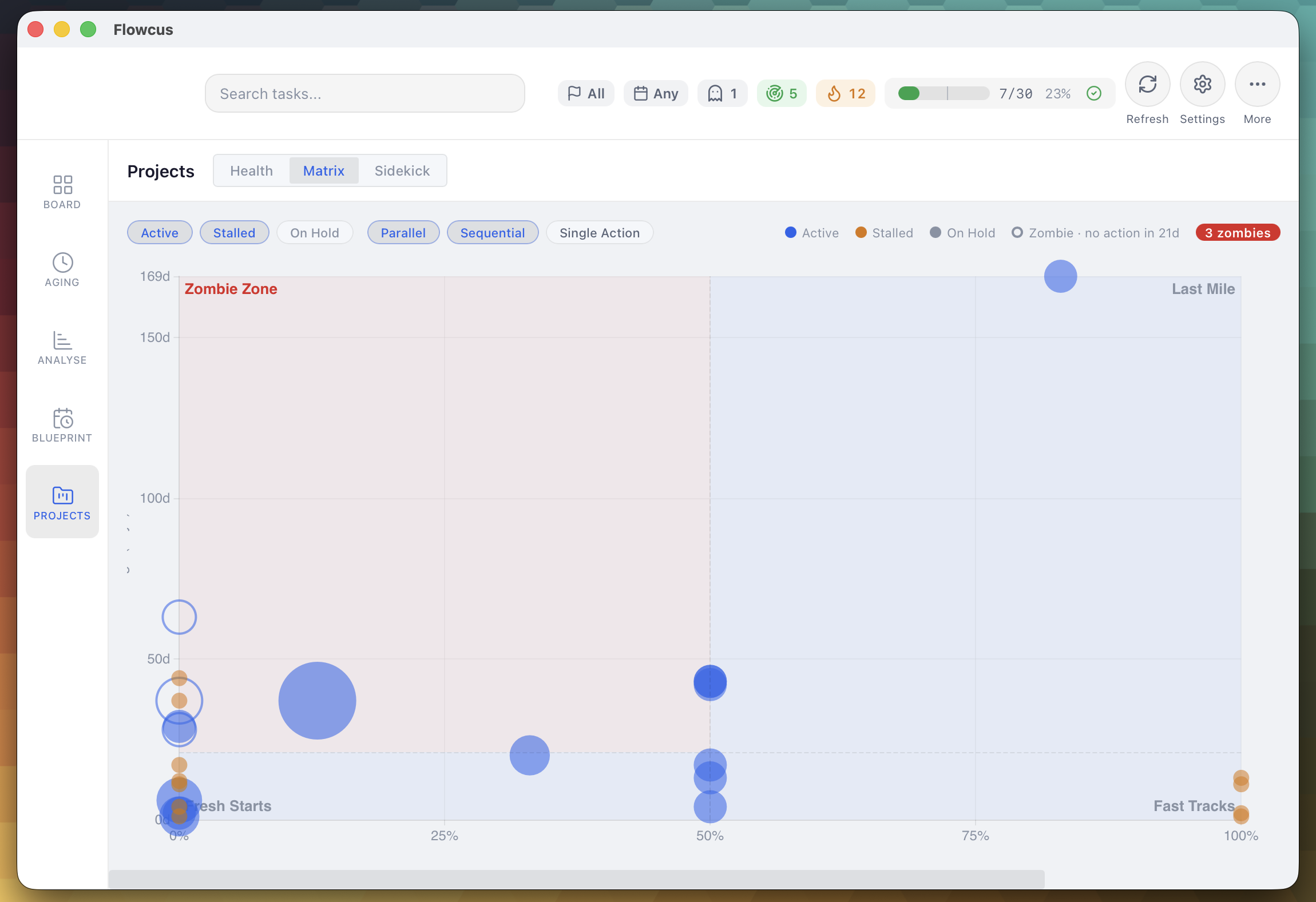
The Matrix tab plots your projects on a four-quadrant scatter so you can see the whole portfolio at a glance and spot where each project sits in its lifecycle. It's the same data as the Health list, drawn spatially.
- Horizontal axis — completion %, from 0% (left) to 100% (right).
- Vertical axis — project age in days, youngest at the bottom, oldest at the top.
- Bubble size — the number of remaining actions, so the projects carrying the most outstanding work are the most visually prominent.
- Bubble colour — lifecycle status: active reads as the accent colour, stalled as amber, and on-hold as muted grey.
- Zombies stand out as filled bubbles (versus outlined), so dead projects are obvious even in a crowded chart.
The chart is divided at 50% completion and 21 days of age, giving four quadrants:
| Quadrant | Position | What it means |
|---|---|---|
| Fresh Starts | Bottom-left | Young and not far along — newly started projects still finding momentum. |
| Fast Tracks | Bottom-right | Young and well advanced — projects moving quickly toward completion. |
| Last Mile | Top-right | Older but mostly complete — a final push will close them out. |
| Zombie Zone | Top-left | Old and barely started — the projects most likely to be stuck or abandoned. |
Hovering a bubble shows the project's name, completion, age, remaining actions, and how long since its last activity — plus a zombie warning where it applies. A badge surfaces how many zombies are in view. Projects with no recorded creation date can't be placed on the age axis and are left out of the chart, so the Matrix may show fewer projects than the Health list.
Help shape the Projects view
Both the Health list and the Matrix are in beta, and the signals, thresholds and layout are still settling. If anything here is unclear, a signal feels off, or there's information you'd like to see surfaced — please email feedback@getflowcus.app or share an idea on the roadmap. Your feedback can directly shape what these views become.